Great custom luggage tags start with artwork prepared for the material: a clean vector logo, a color plan that suits how the tag is decorated, and a careful read of the proof. Shop Custom Luggage Tags returns a free mockup within 24 hours, so you can check placement, contrast and detail before a single tag is produced.
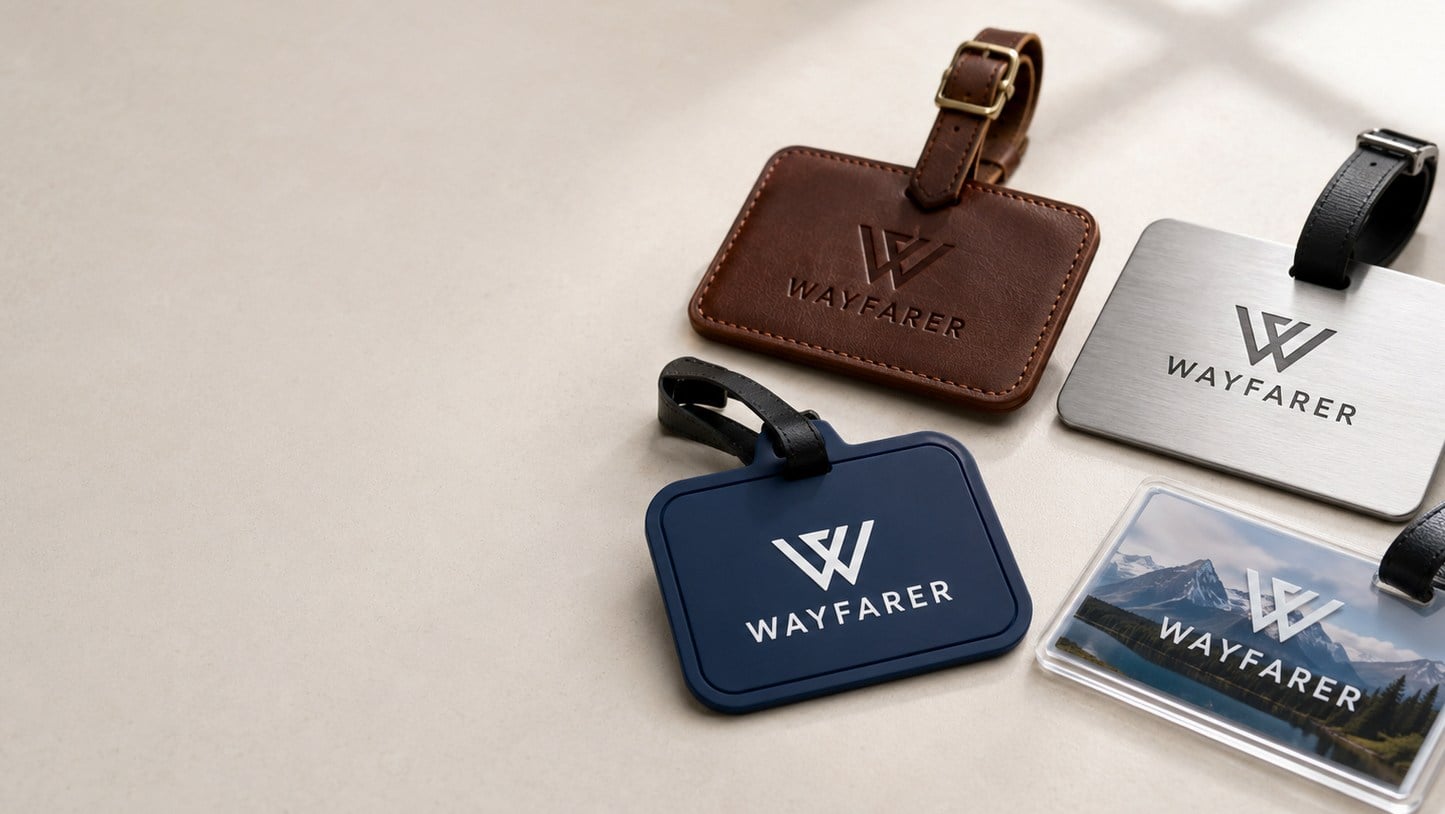
- Vector logo files give the sharpest result on every luggage tag material
- Debossed leather and engraved aluminum or wood show one tone, not full color
- Full-color PVC and silicone tags carry the most color detail
- Free mockup within 24 hours and unlimited free revisions
- Minimum order 12; standard turnaround about 2 weeks after approval
What logo file should I send for custom luggage tags?
Send a vector version of your logo whenever you have one. Vector artwork, the kind your designer exports from Illustrator as an AI, EPS, SVG or vector PDF file, is built from paths rather than pixels, so it scales cleanly to the small face of a luggage tag without soft edges. That matters more on a tag than on a banner, because the logo area is small and every blurred edge is visible up close.
If you only have a JPG or PNG, send the largest, cleanest copy you can find. The team at Shop Custom Luggage Tags will review it during the mockup stage and tell you if the file needs to be redrawn before production. A screenshot from a website or a logo copied from an email signature is usually too small to hold up.
- Best: vector AI, EPS, SVG or PDF with fonts converted to outlines
- Workable: a large, high-resolution PNG with a transparent background
- Risky: small JPGs, screenshots and logos pulled from social media
How does the luggage tag material change what your artwork can do?
The material and decoration method decide how much color and detail your luggage tags can carry, so the artwork should be planned around the tag you choose. A debossed leather tag presses the logo into the surface in a single tone. A laser-engraved wooden or anodized aluminum tag reveals a contrasting tone underneath. Full-color PVC and silicone tags can reproduce multiple brand colors.
Choosing the material first saves revision rounds. If your logo depends on a gradient or several colors to be recognized, a one-tone method will flatten it, and you may want a simplified version of the mark for that tag.
| Tag material | Typical decoration | What the artwork should be |
|---|---|---|
| Genuine leather | Debossed or embossed | One tone, bold shapes, no fine hairlines |
| Vegan leather | Debossed or laser engraved | One tone, simple mark with clear spacing |
| Wood | Laser engraved | One tone, solid fills read better than thin lines |
| Anodized aluminum | Laser engraved or printed | Crisp vector lines; engraving shows the bright metal |
| Full-color PVC | Full-color print | Multi-color logos, photos and patterns all work |
| Silicone | Molded or printed color fills | Bold, separated color areas rather than tiny detail |

Which colors work best on printed vs engraved luggage tags?
On printed luggage tags, choose colors with strong contrast against the tag base; on engraved or debossed tags, the material itself sets the color, so you choose the base tone rather than the ink. A navy logo on a black PVC tag can disappear in an airport baggage hall, while the same logo on a white or light gray tag stays readable from across the carousel.
If your brand uses specific color matches, list them in your quote request. Shop Custom Luggage Tags will show the colors on the mockup so you can confirm the overall look. Keep in mind that a screen and a printed tag will never match perfectly, so judge the mockup for contrast and balance rather than an exact shade.
- Pair dark logos with light tag bases and light logos with dark bases
- Ask for a one-color version of your logo for engraved and debossed tags
- Avoid placing thin text on busy photo backgrounds on full-color PVC
- Think about the strap and loop color as part of the palette
How much detail can a small luggage tag face hold?
A luggage tag face holds far less detail than most people expect, so simplify the artwork before you send it. Taglines, small website addresses, fine outlines and tiny secondary icons tend to fill in on debossed leather and blur on molded silicone. The logo mark itself, sized as large as the tag allows, almost always looks more premium than a crowded layout.
Look at your full layout at actual size on a phone screen before you send it. If you have to squint to read any element, it will be harder to read on the finished tag. The mockup from Shop Custom Luggage Tags shows the design on the tag, which makes this check easy.
- Keep the logo as the single hero element on the front
- Move secondary information, such as a website or slogan, to the back
- Thicken hairline strokes and open up tight letter spacing
- Leave margin around the edges and the strap hole so nothing gets cut
Should the back of the luggage tag be designed too?
Yes, plan the back of the luggage tag at the same time as the front, because the back is where the tag becomes useful to a traveler. Most custom tags keep the front for the brand and use the back for an ID window, a write-on area or printed contact fields. Some buyers add a short message, an event name or a QR code that points to a lost-bag page.
Our earlier guide on what to put on a luggage tag covers the privacy side of contact details. From an artwork point of view, the key is to decide early whether the back is blank, printed or engraved, because that choice can affect which material and decoration method fit the project.
- Front: logo, brand mark or event artwork
- Back: ID window, write-on panel, QR code or short message
- Personalized runs: confirm which field changes from tag to tag
How do you check a luggage tag proof before approving it?
Read the luggage tag proof slowly and check it against a short list: spelling, logo version, colors, placement, size relative to the tag, strap color and quantity. The proof is the last moment where changes are free and simple, and Shop Custom Luggage Tags offers unlimited free revisions until you are happy. You pay nothing until you approve the design.
Have a second person review the proof, ideally someone who did not write the copy. Fresh eyes catch the missing letter in a company name or the outdated logo that slipped into the file. If you are ordering personalized tags with different names, check the name list as carefully as the artwork.
- Spelling of every word, including small print on the back
- Correct, current logo version and color choices
- Logo placement and margins around the strap hole
- Tag material, size, strap and finish match what you ordered
- Quantity, delivery address and in-hand date
What artwork mistakes slow down a luggage tag order?
The artwork mistakes that slow down luggage tag orders are predictable: low-resolution logos, multi-color artwork sent for a one-tone method, text too small for the tag face, and late changes after approval. Each one adds a revision round, and late changes can push production past the standard turnaround of about 2 weeks.
Most of these are easy to prevent. Gather the vector logo and the brand colors before you request a quote, decide on the material, and agree internally on who gives final approval. When one person owns the sign-off, the proof stage moves quickly and the tags arrive when you need them.
- Sending a logo pulled from a website instead of the original file
- Expecting a gradient to show on debossed leather or engraved wood
- Adding a full tagline and web address to the front face
- Several stakeholders sending conflicting revision notes
- Changing the design after approval
When the artwork is ready, request a quote with your logo, preferred material and quantity, and the free mockup will follow within 24 hours. You can also review how it works from mockup to delivery.
Frequently asked questions
Can I send a hand sketch instead of a finished logo for luggage tags?
Custom luggage tags can start from a hand sketch, a photo of an existing tag or a rough idea. Send the clearest version you have along with a short description of the look you want. Shop Custom Luggage Tags will turn the concept into a digital mockup within 24 hours, and you can request unlimited free revisions before anything goes into production.
Will a gradient logo work on debossed leather luggage tags?
Debossed leather luggage tags press the design into the surface in a single tone, so gradients, shadows and color blends do not carry over. A solid one-color version of the logo works best. If your brand mark relies on a gradient, consider a full-color PVC or printed aluminum tag instead, or ask for a simplified version of the logo in the mockup.
How small can text be on a custom luggage tag?
Text on custom luggage tags should be large enough to read comfortably at arm's length, which rules out most fine print. Shop Custom Luggage Tags reviews text size on every mockup and will flag anything likely to fill in or blur. Bold, simple fonts hold up best on debossed, engraved and molded tags, while full-color printing allows slightly finer detail.
Do engraved aluminum luggage tags show my brand colors?
Laser-engraved anodized aluminum luggage tags show the logo in the bright metal underneath the colored surface, so the design appears in one tone rather than in brand colors. You choose the tag color to suit your palette. When exact multi-color branding matters, printed aluminum or full-color PVC tags are a better match for the artwork.
Can the front and back of a luggage tag have different designs?
Luggage tags can carry different designs on each side, and many buyers use the front for the logo and the back for an ID window, write-on panel or short message. Mention both sides in your quote request. The free mockup from Shop Custom Luggage Tags will show front and back so you can approve the complete tag at once.
Should I add a QR code to my luggage tag artwork?
A QR code on luggage tags works well when it links to a lost-bag page, a contact form or a brand landing page. Give the code enough space and strong contrast so a phone can scan it easily. Full-color PVC and printed aluminum tags reproduce QR codes most reliably, while debossed leather is less suited to fine square patterns.
How do I match my brand colors on full-color PVC luggage tags?
Full-color PVC luggage tags reproduce brand colors well, and listing your exact color references in the quote request helps. Shop Custom Luggage Tags shows those colors on the mockup so you can judge balance and contrast. Screens vary, so treat the mockup as a guide to the overall look rather than a perfect shade match, and mention any colors that are critical.
Can silicone luggage tags reproduce fine logo details?
Silicone luggage tags handle bold shapes and separated color areas best, because the soft material does not hold very thin lines or tiny lettering. Simplify the logo by thickening strokes and removing small secondary elements. The mockup will show how the design translates, and you can adjust the artwork through unlimited free revisions before production starts.
Who should approve the luggage tag proof on a company order?
One person should own final approval of the luggage tag proof, even if several people give input first. Collect feedback internally, combine it into a single set of notes, then send it back. Shop Custom Luggage Tags moves fastest when revision requests arrive together, which keeps the order on track for standard turnaround of about 2 weeks after approval.
What happens if I spot an error after approving my luggage tags?
Luggage tags go into production once the design is approved, so contact the team right away if you notice an error. Changes are simplest before approval, which is why careful proof reading matters. Shop Custom Luggage Tags offers unlimited free revisions during the mockup stage, so take time to check spelling, logo version and placement before you sign off.
Does the strap color need to be part of the luggage tag design?
The strap or loop is part of how custom luggage tags look on a bag, so choose its color alongside the artwork. A strap that matches the tag reads as calm and premium, while a contrasting strap helps a bag stand out on the carousel. Mention your strap preference in the quote and it will appear on the mockup.
Get a free mockup for your luggage tags
Send your logo or idea and the quantity you have in mind. Shop Custom Luggage Tags returns a free mockup within 24 hours, you approve the design before anything is produced, and standard turnaround is about two weeks with faster options available. Get a custom quote.