A luggage tag with a QR code turns a lost bag into a solvable problem. Instead of printing your home address on a paper insert for anyone at the carousel to read, a smart tag points a finder to a private contact channel: they scan, you get a notification, and you decide how much to share. For a brand ordering tags as travel gifts, event swag, or a retail line, the technology is worth understanding before you specify a run, because the tag body and the code behind it are two separate decisions.
How a QR code luggage tag actually works
The tag itself carries a printed or engraved QR code. When someone points a phone camera at it, the code resolves to a web address rather than to your raw details. That address usually opens a simple page where the finder can send a message or reveal whatever contact method you have chosen to expose. Modern phones read standard QR codes with the native camera app, so no dedicated application is required on the finder’s side for the basic recovery flow to work. Some vendors layer an app on top to streamline messaging or add tracking, but the baseline case is a plain camera scan.
The privacy advantage is structural. A traditional tag shows a fixed block of text; a scan-based tag shows only what its owner has configured, and only at the moment of a scan. That means you can list an email or a forwarding number without ever printing your street address on the outside of a bag that sits unattended in cargo holds and hotel lobbies.
Static versus dynamic codes, and why it matters
A static QR code encodes its destination permanently. Whatever it pointed to on the day it was printed, it points to forever. A dynamic code instead encodes a short redirect that the owner can re-target later, which has three practical consequences. You can update the contact details behind a tag after it is printed, so a change of phone number does not turn a whole order into scrap. You can often enable scan notifications, so you learn the moment a bag is found rather than waiting for a call. And for a business printing tags in bulk, you avoid reprinting costs when information changes.
The trade-off is dependence. A dynamic code relies on the redirect service staying online, and many of those services carry a subscription. Before committing a large branded run to one platform, confirm what happens to the codes if the vendor folds or you stop paying, since a redirect that goes dark takes the tag’s usefulness with it. A static code, by contrast, keeps working with no third party in the loop, at the cost of never being editable. For giveaways where you control the landing page yourself, a static code pointing at your own domain can be the more durable choice.
Choosing the tag body: material and size
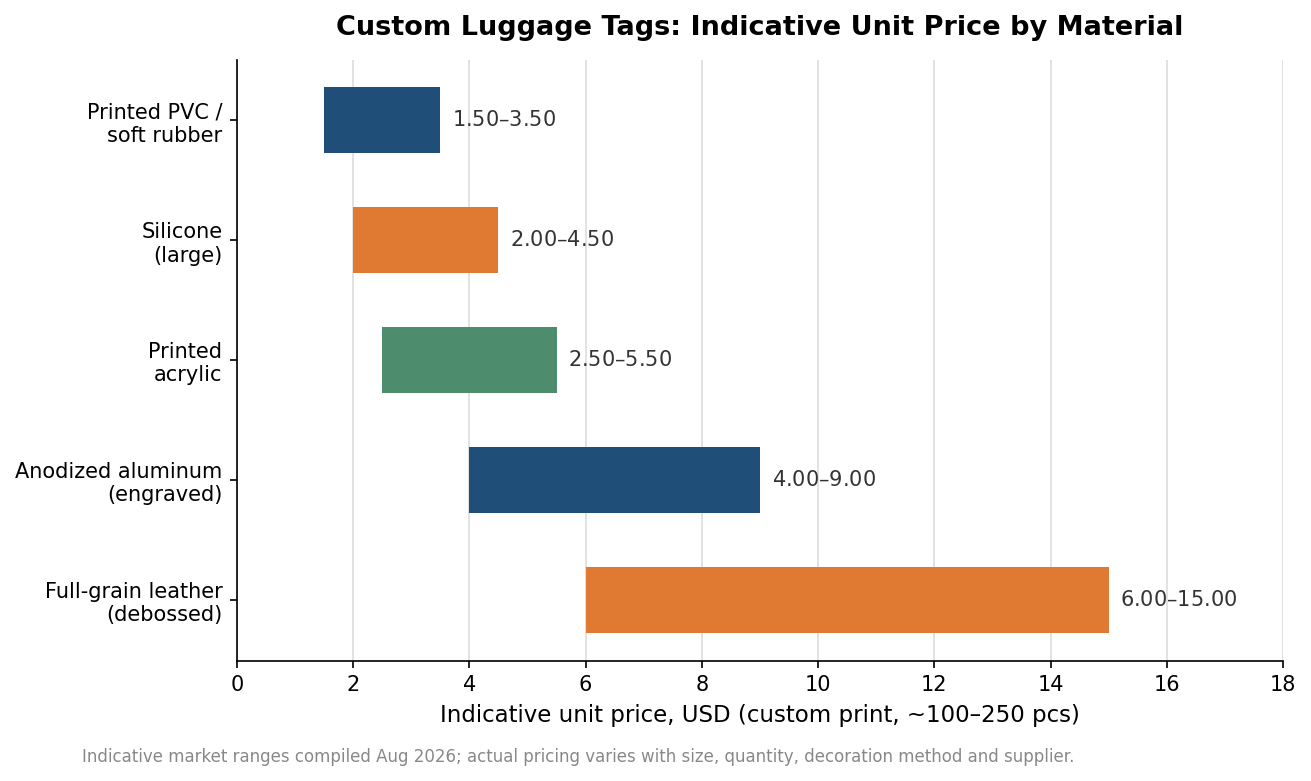
The code is only as reliable as the surface it rides on, and material is where most of the cost and durability differences live. Printed PVC and soft rubber tags are the workhorses of the category: lightweight, water resistant, cheap in volume, and forgiving of rough baggage handling. Silicone behaves similarly and flexes without cracking, which suits it to bags that get crushed into overhead bins. Anodized aluminum and full-grain leather move the product upmarket, trading a higher unit price for a premium feel that matters when the tag is a gift or a retail item rather than a functional label.
Whatever the material, the QR code needs a quiet zone and enough physical size to scan cleanly. As a practical floor, keep the printed code at least around 20 by 20 millimeters with a clear margin around it, which most standard tag faces in the 50-to-90 millimeter range accommodate comfortably. Darker inks on light backgrounds scan most reliably; very glossy or metallic finishes over the code can defeat a camera under bright light, so it is worth proofing a sample scan before approving a full run.
Specifying a custom run: quantity, decoration, and lead time
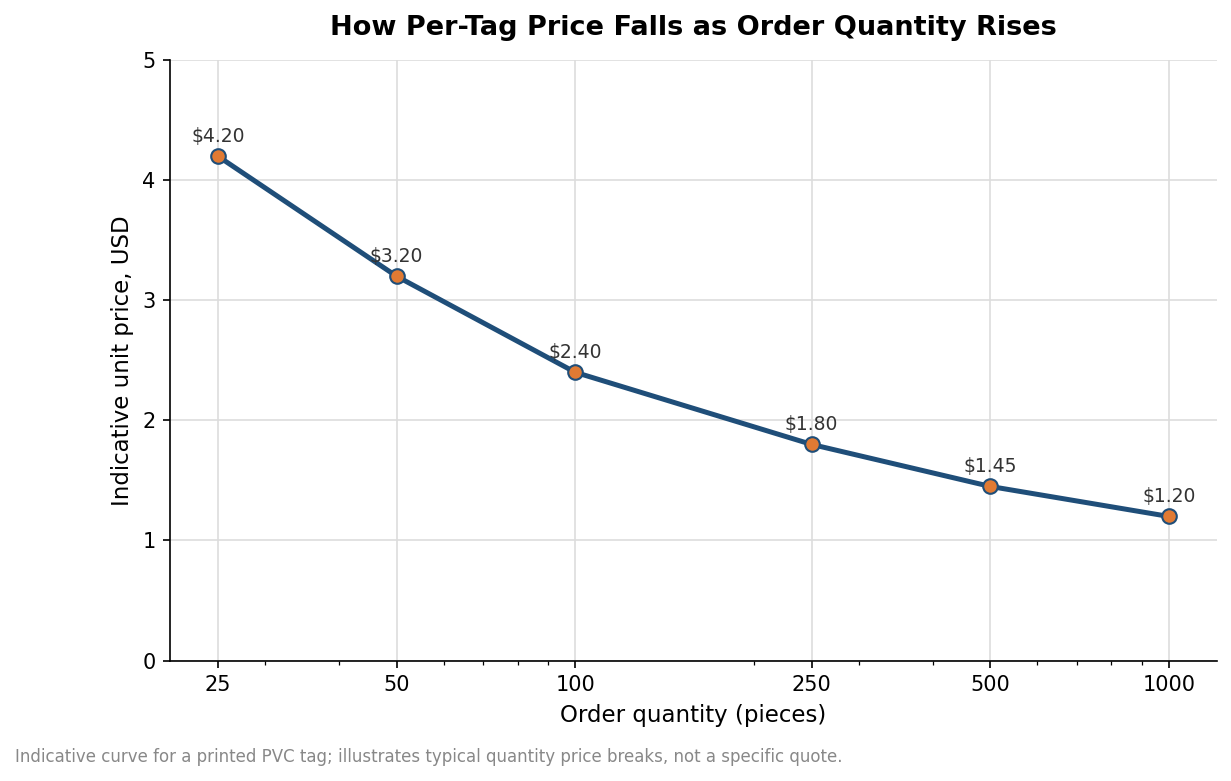
Once material and code type are settled, the order specifics drive the invoice. Unit price falls steeply with quantity, which is the single biggest lever most buyers have. A run of a few dozen tags carries all the setup cost across very few pieces; the same tag ordered by the hundred or thousand spreads that fixed cost thin and can cut the per-tag price by half or more. If a tag is going into recurring gift bags or a store, ordering deeper is almost always cheaper per unit than repeated small batches.
Decoration method interacts with material. Full-color printing suits PVC, silicone, and acrylic and reproduces a QR code and logo together in one pass. Metal and leather usually rely on engraving or debossing, which looks refined but reproduces a scannable QR code less reliably than print, so many premium tags pair an engraved logo with a separately printed or laser-marked code panel. On lead time, plan for a proof cycle plus production; a typical custom order runs on the order of two to three weeks from artwork approval, longer if you are sampling materials first or shipping internationally. Treat any single figure here as indicative, since it swings with decoration complexity and supplier backlog.
Where smart tags help, and where they do not
A QR tag is a recovery aid, not a tracker. It does nothing until a human finds the bag and chooses to scan it, which makes it excellent for the lost-and-handed-in case and useless for locating a bag still moving through a mis-routed transfer. Travelers who want live location need a separate Bluetooth or GPS device; the two pair well, with the tracker telling you where the bag is and the QR tag telling a finder how to reach you. For a brand, the honest pitch is privacy and reunification, not surveillance.
The category also rewards restraint in what you print. The whole point of a scan-based system is that the outside of the bag reveals nothing sensitive, so resist the temptation to add a name and phone number in plain text beside the code. Keep the visible face to a logo and the code, let the scan carry the contact details, and you get the branding benefit of a custom tag without reintroducing the exposure the QR code was meant to remove.
Leave a Reply